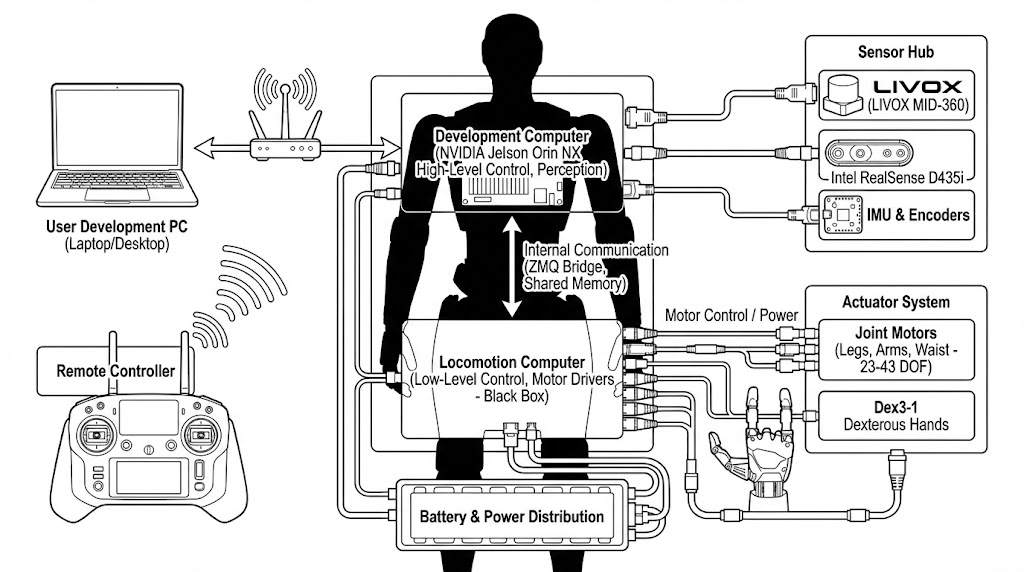
You can install the Unitree SDK for Python by cloning the repository and installing it locally. It's recommended to do this within a virtual environment.
# Create a virtual environment (optional but recommended)
python3 -m venv venv
source venv/bin/activate  # On Windows, use `venv\Scripts\activate`

# Install the SDK from the cloned repository
pip install .
1.1. Services
The G1 SDK is built upon a service-oriented architecture. Each major functional component of the robot is exposed as a service that you can interact with. The primary services are:
Arm Service (`arm`): For controlling the robot's arms.
Audio Service (`voice`): For text-to-speech, audio playback, and controlling the LED lights.
Locomotion Service (`sport`): For controlling the robot's movement and posture.
1.2. Clients
To interact with a service, you must create a client object. Each service has a corresponding client class (e.g., G1ArmActionClient for the Arm service). You must initialize the client before calling its methods.
1.3. Initialization
Before using any of the SDK's clients, you must initialize the channel factory with your network interface. This is a crucial first step for communication with the robot.
import sys
from unitree_sdk2py.core.channel import ChannelFactoryInitialize

if __name__ == "__main__":
    if len(sys.argv) < 2:
        print(f"Usage: python3 {sys.argv[0]} networkInterface")
        sys.exit(-1)

    # Initialize the channel factory
    ChannelFactoryInitialize(0, sys.argv[1])

    # ... create and use clients here
Run Instructions
Network Setup
To communicate with the G1 robot, your computer must be on the same network as the robot's control computer. The most common method is a direct Ethernet connection.
Connect: Connect an Ethernet cable from your computer to the Ethernet port on the robot.
Robot IP: The robot has a fixed static IP address: 192.168.123.164.
Configure Your Computer: You must assign a static IP address to your computer's Ethernet port on the same subnet. A common choice is 192.168.123.200.
Find your network interface name: Use ip a or ifconfig in your terminal. Look for an interface name like eth0, enp0s31f6, or similar.
Assign the static IP (Linux):
# Replace <interface_name> with your actual interface name
sudo ip addr add 192.168.123.200/24 dev <interface_name>
sudo ip link set <interface_name> up
Verify Connection: You should now be able to ping the robot:
ping 192.168.123.164
Running an Example
The example scripts provided in this SDK require you to specify the network interface that is connected to the robot.
Command:
# Replace <your_network_interface> with the name you found in the previous step
python3 example/g1/high_level/g1_loco_client_example.py <your_network_interface>
This will run the locomotion example, allowing you to send movement commands to the G1 robot. The same principle applies to other examples in the example/g1/ directory.
Arm Service (`arm`)
Service Name: arm
Client Class: G1ArmActionClient
Example Initialization
from unitree_sdk2py.g1.arm.g1_arm_action_client import G1ArmActionClient

arm_client = G1ArmActionClient()
arm_client.SetTimeout(10.0)
arm_client.Init()
Constants
action_map: A dictionary mapping human-readable action names to their corresponding integer IDs.
action_id (int): The integer ID of the action to execute. Use the action_map to find the correct ID.
Returns:code (int) - The status code of the operation. 0 indicates success.
GetActionList()
Retrieves a list of available arm actions.
Returns: A tuple (code, data) where code is the status code and data is a list of available actions if successful.
Audio Service (`voice`)
Service Name: voice
Client Class: AudioClient
Example Initialization
from unitree_sdk2py.g1.audio.g1_audio_client import AudioClient

audio_client = AudioClient()
audio_client.SetTimeout(10.0)
audio_client.Init()
Methods
TtsMaker(text, speaker_id)
Performs text-to-speech.
Parameters:
text (str): The text to be spoken.
speaker_id (int): The ID of the speaker voice to use.
Returns:code (int) - The status code.
LedControl(R, G, B)
Sets the color of the LED lights.
Parameters:
R (int): Red component (0-255).
G (int): Green component (0-255).
B (int): Blue component (0-255).
Returns:code (int) - The status code.
SetVolume(volume)
Sets the audio volume.
Parameters:
volume (int): Volume level (0-100).
Returns:code (int) - The status code.
GetVolume()
Returns the current volume level.
Returns: A tuple (code, data) where code is the status and data contains the volume if successful.
PlayStream(app_name, stream_id, pcm_data)
Plays an audio stream.
Parameters:
app_name (str): The name of the application.
stream_id (str): The ID of the stream.
pcm_data (bytes): The raw PCM audio data.
Returns: Status of the call.
PlayStop(app_name)
Stops audio playback.
Parameters:
app_name (str): The name of the application to stop playback for.
Returns:0 on success.
Locomotion Service (`sport`)
Service Name: sport
Client Class: LocoClient
Example Initialization
from unitree_sdk2py.g1.loco.g1_loco_client import LocoClient

loco_client = LocoClient()
loco_client.SetTimeout(10.0)
loco_client.Init()
Methods
Move(vx, vy, vyaw, continous_move=False)
Moves the robot with a given velocity.
Parameters:
vx (float): Forward velocity in m/s.
vy (float): Lateral velocity in m/s.
vyaw (float): Rotational velocity in rad/s.
continous_move (bool): If True, the robot moves indefinitely. If False (default), it moves for a short duration.
Damp()
Puts the robot in a damped, stable state. This is equivalent to SetFsmId(1).
Squat2StandUp() / StandUp2Squat()
Commands the robot to stand up from or to a squatting position. Equivalent to SetFsmId(706).
Lie2StandUp()
Commands the robot to stand up from a lying position. Equivalent to SetFsmId(702).
LowStand() / HighStand()
Commands the robot to a low or high standing posture.
WaveHand(turn_flag=False)
Commands the robot to wave its hand.
Parameters:
turn_flag (bool): If True, the robot will turn around while waving.
ShakeHand(stage=-1)
Commands the robot to perform a handshake action.
Parameters:
stage (int): Manages the handshake stage. -1 toggles between stages. 0 and 1 set specific stages.
ZeroTorque()
Sets the robot's joints to zero torque, making them compliant. Equivalent to SetFsmId(0).
SetFsmId(fsm_id)
Sets a specific state machine ID for low-level control.
Parameters:
fsm_id (int): The finite state machine ID.
SetVelocity(vx, vy, omega, duration=1.0)
Low-level method to set velocity for a specific duration.
Parameters:
vx, vy, omega (float): Velocities.
duration (float): Duration in seconds.
Examples
Arm Action Example
This example demonstrates how to make the G1 robot perform a "shake hand" action.
# Assuming ChannelFactory is initialized
from unitree_sdk2py.g1.arm.g1_arm_action_client import G1ArmActionClient, action_map

arm_client = G1ArmActionClient()
arm_client.Init()

# Execute the 'shake hand' action
print("Executing 'shake hand'...")
arm_client.ExecuteAction(action_map.get("shake hand"))
Audio and LED Example
This example shows how to use text-to-speech and control the LEDs.
# Assuming ChannelFactory is initialized
import time
from unitree_sdk2py.g1.audio.g1_audio_client import AudioClient

audio_client = AudioClient()
audio_client.Init()

print("Speaking a message...")
audio_client.TtsMaker("Hello, I am the G1 Robot!", 0)
time.sleep(3)

print("Changing LED color to blue...")
audio_client.LedControl(0, 0, 255)
Locomotion Example
This example shows how to make the robot move forward and then wave its hand.
# Assuming ChannelFactory is initialized
import time
from unitree_sdk2py.g1.loco.g1_loco_client import LocoClient

loco_client = LocoClient()
loco_client.Init()

print("Moving forward...")
loco_client.Move(0.3, 0, 0)
time.sleep(2)

print("Stopping and waving hand...")
loco_client.Move(0, 0, 0) # Stop moving
loco_client.WaveHand()